App Store & Google Play Rejections: The 4 Mistakes Behind Most of Them
App rejections happen for all kinds of reasons, crashes, missing permissions, in-app purchase issues, plenty of things that have nothing to do with paperwork. But when it comes to first-submission rejections specifically, the ones that catch new Makers off guard, a huge share trace back to four things that live in your screenshots, your privacy policy, and your listing, not your code. Those are the four this post is actually about.
1. You Guess the Requirements

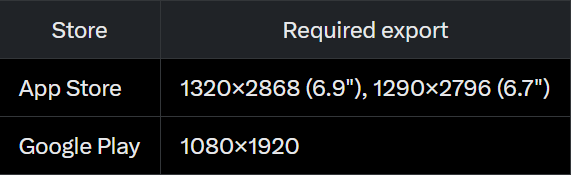
Screenshot sizing is the easiest mistake to make because it feels like it shouldn't matter that much. It does, and both stores check it automatically before a human reviewer ever opens your submission.
Miss any of these, upload the wrong device variant, or skip one entirely, and the file gets bounced before your app's quality even comes into it.
2. You Leave Compliance for Last

Privacy policy, terms of service, Data Safety answers, age rating; these get treated like the boring paperwork at the end so they get rushed. That's exactly backwards because this is where most rejections in 2026 actually come from, on both stores for the same underlying reason: what you declare in one place doesn't match what you declare (or what your app actually does) somewhere else.
On the App Store:
⚫Guideline 5.1.1 requires a working privacy policy link in two places at once, your App Store Connect metadata and somewhere inside the app itself. Reviewers also check that your App Privacy labels match what your app actually does.
⚫Guideline 1.5 requires a working support URL. A broken link here is an entirely avoidable rejection.
On Google Play:
⚫The Data Safety section in Play Console has to match your privacy policy in substance. Say your policy doesn't mention location data, but an ad SDK quietly collects it in the background and your form doesn't reflect that, Google's automated binary scan now catches that gap directly. In 2025 alone, this kind of enforcement blocked over 255,000 apps from gaining data access they hadn't declared.
⚫Your store listing contact details (a verified email and a phone number for organization accounts) have to stay accurate for as long as your account exists, letting them lapse can block you from publishing at all.
None of these rules are hard to follow. They're just easy to break by accident when you rush them at the end instead of setting them up early.
3. You Treat Listing Fields Like Filler

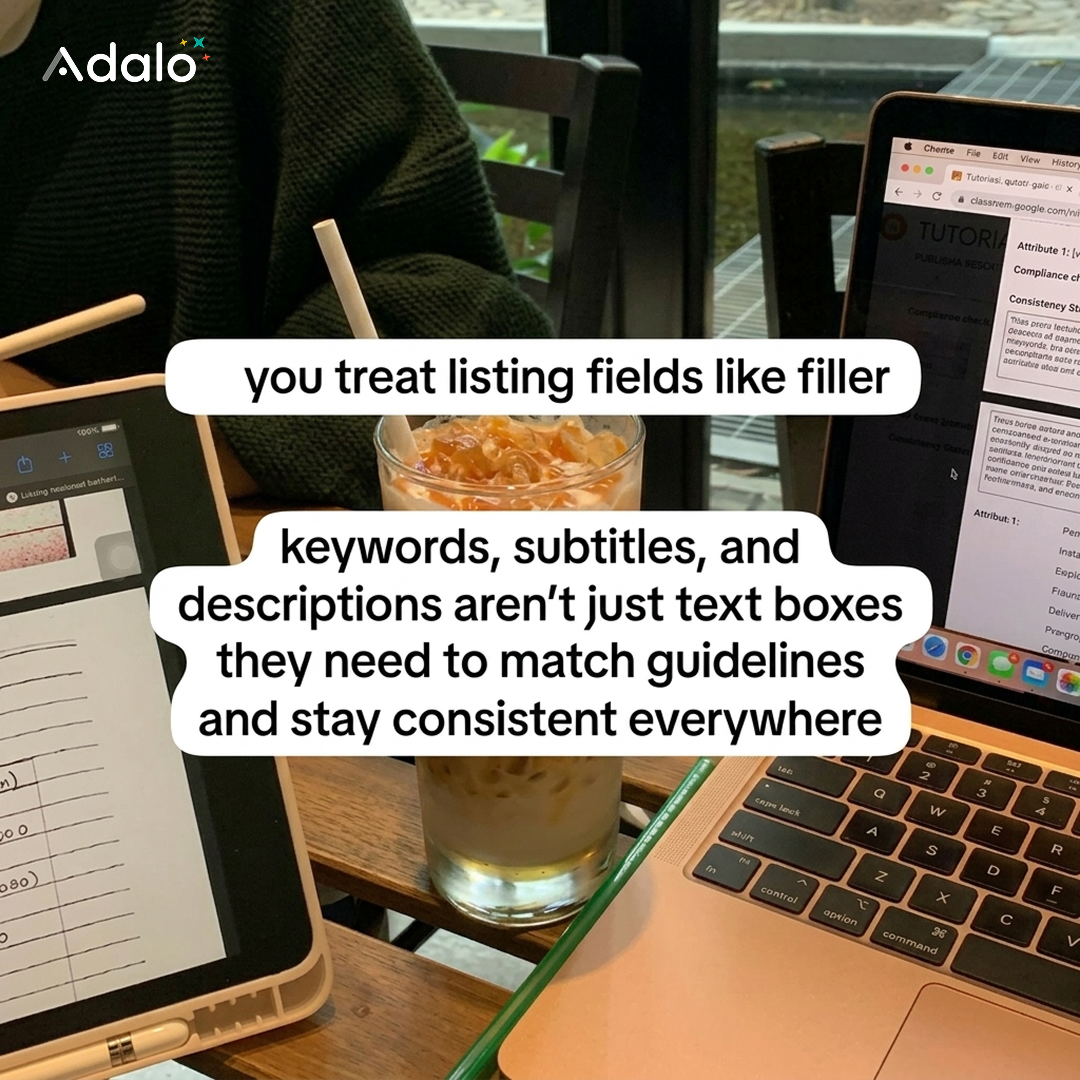
Your keywords, subtitle, and description aren't just text boxes to fill in fast, they have hard limits, and going over one doesn't get quietly trimmed, it can block your submission outright.
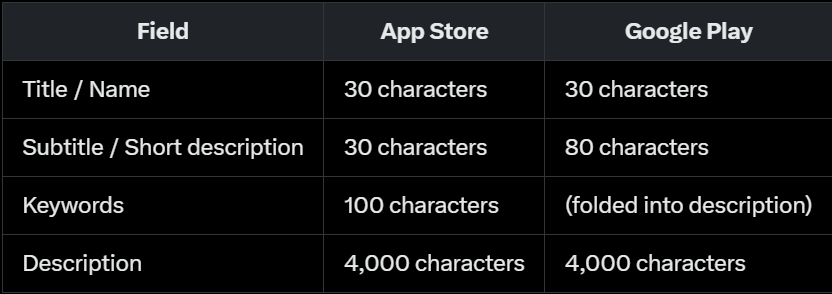
Beyond the limits, both stores expect the words you use here to say the same thing your app actually does, and the same thing everywhere it appears, your listing, your in-app copy, and your privacy policy all need to agree.
"The details are not the details. They make the design." - Mr. Charles Eames
4. You Try to Manage It Across Tools

This is the mistake that causes the other three. Jump between a screenshot tool, a doc for copy, and a policy generator, and it's easy to lose track of what you already fixed and what you haven't touched yet, which is exactly how mismatches like the ones in mistake #2 happen in the first place.
How Adalo Studio Handles All 4?
⚫For guessing requirements (#1): the screenshot builder was just rebuilt into a free-form canvas editor, drag, resize, and rotate anything, zoom and pan each screenshot individually, and export at the exact size each store wants without measuring a single pixel yourself. There was also a real bug where Android exports got cropped, cutting off the top of your logo and most of the bottom nav bar, that's fixed now, so what you export actually matches what you designed.
⚫For compliance left for last (#2): generate a real Privacy Policy and Terms of Service based on what your app actually does and how you answer the follow-p questions, ready to publish and link straight from your listing, well before submission day instead of the night before.
⚫For listing fields treated as filler (#3): get pre-filled App Store Connect and Google Play Console fields (app name, subtitle, keywords, descriptions, age rating, Data Safety answers) pulled straight from your app, with a copy button on every field, so what you paste into the store portal actually matches what you shipped.
⚫For managing it all across tools (#4): the whole editor is now one tabbed panel instead of a long scroll of stacked sections, Assets, Elements, and Background stay one click away, and a sticky top bar with step jump-nav (Generate → Templates → Edit) means Export is always visible, not buried at the bottom of the page. There's also a fix on the account side: if you paid and got bounced back to a paywall by mistake, that's resolved too, payment verification now retries instead of giving up on the first check.
See the changes : https://x.com/AdaloHQ/status/2080673253018960125
It's free to design. You only pay to export or to use the AI features, and it comes included at no extra cost with any Adalo paid plan.
Frequently Asked Questions
Do I need Photoshop or Figma to use Adalo Studio?
No. Templates, frames, fonts, exports, and document generation all happen in the browser. If you can paste a URL, you can build a store-ready listing.
Can I use Adalo Studio if my app wasn't built in Adalo?
Yes. Upload your own screenshots instead of pulling from an app link, and the framing and export tools work the same way regardless of what your app was built in.
Will Adalo Studio save my progress if I close the tab?
Yes. Screenshots auto-save as you go, and any document you generate saves the moment it's created.
The Truth About Rejections

Four fixable things, caught early is the difference between a submission that sits in review for a day and one that bounces back with a form email. Same app either way.
Ready to try the new canvas editor? Build your screenshots at studio.adalo.com