The Complete App Store Submission Checklist (Free & Printable)
Most app rejections aren't about quality. They're about a missing screenshot size, a broken privacy URL, or a data declaration that doesn't match the app. Every one of those is preventable with a checklist you actually run through before hitting submit.
This is that checklist — organized by stage, covering both the Apple App Store and Google Play, and built to be printed or copied into your notes. Tick each box. If everything's checked, you're ready to submit with confidence. For the full narrative of how these stages fit together, see the pillar guide on how to publish an app without code.
How to use this checklist?
Work top to bottom. Each section is a gate — don't move to the next until the current one is fully checked. Items marked (Apple) or (Google) apply to that store only; everything else applies to both. Copy the boxes below into your project notes, or print the page and check them off by hand.
1. Developer account & app record
▶️ Apple Developer Program membership active ($99/year) (Apple)
▶️ Google Play Developer account created and identity-verified ($25 one-time) (Google)
▶️ App record created in App Store Connect (Apple)
▶️ App created in Play Console (Google)
▶️ Bundle ID / package name finalized (you can't change it later)
▶️ App name reserved and available on the store
▶️ Primary and secondary categories chosen
▶️ Content / age rating questionnaire completed
2. The build itself
▶️ App tested on a real device, not just a simulator
▶️ Every core flow works: sign-up, login, password reset, logout
▶️ No crashes on launch or during normal use
▶️ All placeholder text, dummy data, and "lorem ipsum" removed
▶️ No broken buttons, dead links, or empty screens
▶️ App handles no-internet / offline state gracefully
▶️ Version number and build number set correctly
▶️ Third-party logins (if any) work with real credentials
▶️ Push notifications tested (if used)
▶️ Payments / in-app purchases tested in sandbox (if used)
▶️ .ipa exported and uploaded to App Store Connect (Apple)
▶️ .aab uploaded to a release track in Play Console (Google)
▶️ Build run through internal or closed testing before production (Google)
3. Visual assets
Getting a dimension wrong here is one of the most common auto-rejections. Use the confirmed 2026 sizes below.
▶️ App icon uploaded (1024 × 1024 px, no transparency, no rounded corners baked in)
▶️ iPhone 6.9" screenshots — 1320 × 2868 px (Apple)
▶️ iPhone 6.7" screenshots — 1290 × 2796 px (Apple)
▶️ iPad Pro screenshots included if the app supports iPad (Apple)
▶️ Google Play phone screenshots — 1080 × 1920 px (Google)
▶️ At least 2 screenshots per required device (aim for 4–8)
▶️ Feature graphic — 1024 × 500 px (Google)
▶️ Screenshots use captions and consistent branding, not raw captures
▶️ App preview / promo video (optional but recommended)
Build every image at the exact export size with the app store screenshot generator, and confirm each slot against the complete app store screenshot sizes guide before you upload.
4. Store listing & metadata
▶️ App name set (≤30 chars, includes a keyword if natural) (Apple)
▶️ Subtitle written (≤30 chars) (Apple)
▶️ Keywords field filled — 100 chars, comma-separated, no spaces (Apple)
▶️ Promotional text set (updatable without review) (Apple)
▶️ Short description written (≤80 chars) (Google)
▶️ Full description written (Google indexes this — use your keywords) (Google)
▶️ Description free of typos, accurate to the app's actual features
▶️ Support URL live and reachable
▶️ Marketing URL added (optional)
▶️ Contact email monitored
▶️ Copyright field completed (Apple)
Weak listing copy costs downloads even when the app is great. Tighten it with the ASO playbook for indie developers before you lock it in.
5. Legal & privacy
▶️ Privacy policy written and hosted at a public, working URL
▶️ Privacy policy URL added to the listing (both stores)
▶️ Privacy policy content matches what the app actually collects
▶️ Terms of service added (recommended, sometimes required)
▶️ Apple App Privacy ("nutrition label") completed in App Store Connect (Apple)
▶️ Google Data Safety section completed in Play Console (Google)
▶️ Data declarations match the privacy policy exactly
▶️ Analytics, ads, and crash-reporting SDK data included in declarations
▶️ Account-deletion URL provided if the app supports account creation (Google)
▶️ "Encrypted in transit" answered honestly (all endpoints use HTTPS) (Google)
No lawyer required for a standard app — generate a policy that reflects your real data collection with the app privacy policy generator. The Data Safety form is where no-code apps most often get flagged, so walk through it field by field.
6. Compliance & review readiness
▶️ Demo account credentials provided if login is required (reviewers need in)
▶️ Review notes written explaining anything non-obvious
▶️ Any special permissions (location, camera, contacts) justified with clear in-app prompts
▶️ Sign in with Apple offered if you offer other social logins (Apple)
▶️ External payment / subscription rules followed (in-app purchase where required)
▶️ No mention of other platforms (don't say "also on Android" in your Apple listing)
▶️ App does something — not just a repackaged website or a thin wrapper
▶️ Age rating matches actual content
▶️ Export compliance / encryption questions answered (Apple)
7. Pre-submit final pass
▶️ Every screenshot slot filled for every required device
▶️ Privacy policy URL clicked and confirmed loading
▶️ Support URL clicked and confirmed loading
▶️ Metadata proofread one more time
▶️ Build selected in the submission (the right version)
▶️ Release option chosen: automatic vs. manual release after approval
▶️ Pricing and availability (countries) set
When all seven sections are checked, submit. If a rejection does come back, it will almost always point to a single item above — fix that one thing and resubmit.
The 8 items that cause most rejections
If you're short on time, these are the boxes that account for the majority of first-round rejections for no-code makers. Double-check them even if you skim the rest.
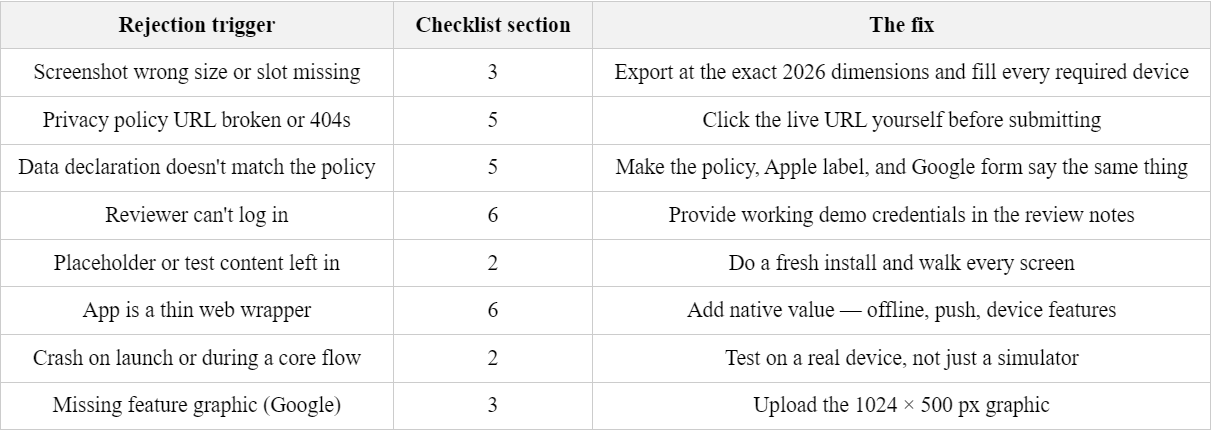
Every one of these is a completeness problem, not a quality problem — which is exactly why a checklist catches them and rushing doesn't. For the deeper reasoning behind each, see why apps get rejected from the app store.
Why this checklist matters?
App review is largely a completeness check. The reviewer confirms your app matches its listing, that your assets are present and correctly sized, and that your declarations are honest. A checklist beats memory because the failure mode isn't building a bad app — it's forgetting one form field at 11pm. Running these boxes end to end is the difference between a one-and-done approval and a week of back-and-forth.
You can do all the design and legal prep for free; you only pay to export final images or use AI assistance. See exactly what's free versus paid on the pricing page before you start.
Frequently asked questions
What do I need to submit an app to the App Store?
You need an Apple Developer Program membership, a tested build, correctly sized screenshots, an app icon, complete listing metadata, a privacy policy URL, and finished App Privacy declarations. Missing any one of these is the most common cause of a first-round rejection.
What's the difference between the App Store and Google Play submission requirements?
The core assets overlap, but Apple uses a keywords field and App Privacy label while Google indexes your full description and uses the Data Safety form and a required feature graphic. Screenshot dimensions also differ between the two stores.
How can I avoid getting my app rejected?
Test on a real device, make sure your privacy policy URL works and matches your data declarations, use correctly sized screenshots, remove all placeholder content, and provide demo login credentials if your app requires an account. Most rejections trace back to one of these.
Do I need a privacy policy to submit my app?
Yes, if your app collects any user data — which includes analytics and crash reporting, so nearly all apps qualify. Both Apple and Google require a working public privacy policy URL on your listing, and it must match your in-console data declarations.
Tools mentioned in this guide:
App Store Screenshot Generator,
App Privacy Policy Generator.